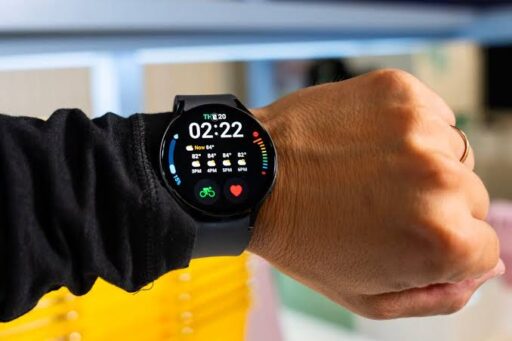

A Samsung Galaxy Watch can track workouts, display notifications, record sleep patterns and provide useful wellness insights without requiring its owner to reach for a phone. However, several common habits can reduce its accuracy, shorten battery life or expose the device to avoidable damage.
Some of these mistakes happen because the watch feels more durable and medically capable than it actually is. Water-resistance ratings can be mistaken for complete waterproofing, health estimates can be treated as diagnoses and an excessively tight strap may be viewed as necessary for accurate tracking.
The exact features and limitations vary across Galaxy Watch generations, regions and software versions. Nevertheless, the following five habits should be avoided by most Galaxy Watch owners.
1. Stop Wearing the Watch Too Tightly All Day
A Galaxy Watch needs reasonably close contact with the skin for optical heart-rate readings and other sensor-based measurements. That does not mean the strap should be tightened until it leaves deep marks or restricts circulation.
Samsung recommends wearing the device securely enough that it does not move excessively, but not so tightly that it becomes uncomfortable or interferes with blood flow. A watch that is too loose may struggle to collect consistent sensor data, while an excessively tight fit can trap sweat and increase friction against the skin.
The correct fit may change depending on the activity. During a workout, the strap can be adjusted slightly tighter to reduce movement. After exercising, it should be loosened or removed so the skin and watch can dry.
Owners should also stop wearing the watch continuously without cleaning the case, sensor area and band. Sweat, sunscreen, soap, oil and skin products can accumulate beneath the device. Samsung’s official Galaxy Watch cleaning guidance recommends cleaning the wrist and band after sweating, using a soft lint-free cloth and drying the watch thoroughly. It also warns against exposing the device to products such as detergents, antibacterial sprays, insect repellents and cosmetics.
Cleaning is not only about appearance. Samsung notes that dirt on the sensor or an improper fit can affect heart-rate and activity tracking. A clean sensor placed securely against dry skin is more useful than a dirty watch tightened excessively.
2. Stop Assuming Water Lock Makes the Watch Waterproof
Water Lock is useful, but its name can create the wrong impression. Activating the feature does not add a protective seal or increase the watch’s water-resistance rating.
The mode primarily disables unintended touchscreen input while the watch is exposed to water. When Water Lock is turned off, supported models may play sounds to help remove water from the speaker area. Samsung explains how the function operates in its Water Lock instructions.
Water resistance depends on the specific model. Some Galaxy Watches are rated for swimming, while others have different limits. Even Samsung’s more rugged Galaxy Watch Ultra is not intended for scuba diving, high-pressure water activities or every underwater environment.
Owners should therefore stop treating Water Lock as permission to expose the watch to any form of water. Hot showers, high-pressure jets, diving, steam rooms and chemical-heavy water may place the device under conditions that differ substantially from laboratory resistance tests.
Salt water and swimming-pool chemicals can also leave residue. Samsung advises rinsing compatible watches with fresh water and drying them after exposure to sea water.
The safest approach is to check the exact water-resistance specification in the model’s user manual before swimming. A rating describes controlled test conditions, not permanent immunity from water damage. Seals can also be affected by age, impacts and repairs.
3. Stop Using Any Random Wireless Charger
Galaxy Watches use a convenient magnetic wireless charging system, but physical compatibility does not guarantee that every charger is appropriate.
A poorly matched charging pad may align incorrectly, charge slowly, generate unnecessary heat or fail to charge the watch consistently. Samsung advises using approved batteries, charging docks, cables and chargers to reduce the possibility of damage. Its Galaxy Watch charging guide also explains that the centre of the watch’s rear surface should be aligned with the centre of the wireless charger.
Compatibility can vary between watch generations. A charging accessory that works with one Samsung watch may not deliver the same speed or reliability with another. Samsung’s newer fast wireless charger, for example, provides fast charging only with specified Galaxy Watch generations, and actual speed depends on the device and charging conditions.
Owners should also stop charging the watch while it is wet, extremely hot or covered in sweat. The rear surface and charger should be clean and dry before they are connected. If the watch becomes unusually hot, charging should be paused until the device returns to a normal temperature.
Samsung’s official smartwatch charging instructions remain the best place to check supported methods, including the charging dock and Wireless PowerShare options available for particular devices.
4. Stop Ignoring Software and App Updates
A Galaxy Watch may appear to work normally for months without an update, but outdated software can leave performance problems, compatibility issues and known bugs unresolved.
Samsung releases updates for the watch operating system, built-in applications and companion software. The update process can usually be started through the Galaxy Wearable application by opening Watch settings and selecting Watch software update. On supported models, updates can also be checked directly from the watch. Samsung recommends having at least a 30% charge before starting the process.
Ignoring updates can also cause inconsistencies between the watch, Galaxy Wearable, Samsung Health and Samsung Health Monitor. When these components are running different or outdated versions, syncing and feature availability may be affected.
Samsung’s smartwatch update guide includes separate instructions for updating the operating system and installed watch applications. Automatic application updates can also be enabled where supported.
Updates should still be installed sensibly. The watch should have adequate power, a stable connection and enough time to restart without interruption. An update should not be started immediately before a workout, journey or important notification window.
Keeping the software current does not guarantee perfect battery life, but Samsung includes updating the watch among its recommended troubleshooting steps for abnormal battery drain. The company also suggests reviewing display settings, background activity and power-saving options when runtime becomes noticeably shorter.
5. Stop Treating Health Readings as a Medical Diagnosis
Galaxy Watch health features can provide valuable trends, but they should not be treated as a substitute for professional medical evaluation.
Samsung Health can record information such as heart rate, sleep, exercise and estimated calorie use. Some models and markets also support electrocardiogram, blood-pressure, body-composition and other advanced measurements. Availability depends on the watch, connected phone, country and regulatory approval.
Samsung clearly states that Samsung Health is intended for fitness and general wellness purposes. It is not intended to diagnose, treat, cure or prevent a disease or medical condition.
The same limitation applies to Samsung Health Monitor. Blood-pressure measurements require supported hardware, correct positioning and periodic calibration with an upper-arm cuff. Samsung says the feature is for wellness use and warns users not to change medication or dosage based solely on watch readings.
A single unusual heart-rate, sleep or blood-pressure result may come from movement, poor skin contact, incorrect placement or environmental conditions. Repeated or concerning results deserve attention, but their meaning should be discussed with a qualified medical professional rather than interpreted through an app alone.
The watch is most useful when it reveals patterns. A sustained change in resting heart rate, sleep duration or activity may help someone recognise that further evaluation is needed. It should support informed healthcare conversations, not replace them.
Better Habits Make the Galaxy Watch More Useful
A Galaxy Watch performs best when it is worn securely but comfortably, cleaned regularly and used within the limits of its hardware.
Water Lock should be treated as a touchscreen feature rather than a guarantee against water damage. Charging should be handled with compatible equipment, while software and watch applications should remain reasonably current. Health measurements should be viewed as wellness information rather than final medical conclusions.
None of these changes requires giving up the watch’s most useful features. They simply reduce unnecessary risks and help the sensors, battery and software work as intended.